Use OTHER Facilities when you have a Facility that has waste to be disposed but it is not FOG. For example, locations that originate septic disposals can be tracked here.
|
OTHER Facility Information |
The
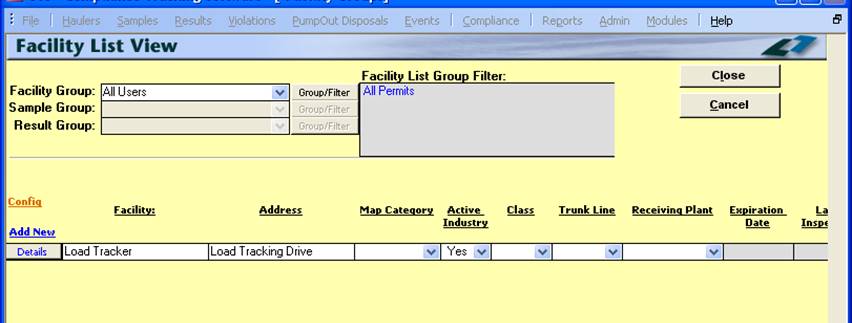
Facility List View displays basic information for Facilities. The user can
sort and group which Facilities are displayed using the Group / Filter Button. You can also select which Group of Facilities is
displayed using the “Facility Group”: selection allowing you to use any
Groups you may have created. The
Sample Group and Result Group selectors are not enabled on this form. |
|
Adding a New OTHER Facility |
A
new OTHER Facility can be created during the Disposal Entry process. See the Create New Facility screens under Disposals where you
select OTHER as the Application / Module to add the New Facility to. A
new Facility can also be created from the OTHER Facility List View Screen.
Click the Add New, which opens the Other Facility Types Details Screen, and then enter in the OTHER Facility NO,
the Company Name and other location and account information. NOTE: From the OTHER
Facility Details Screen you can ONLY edit
the information on the Site Info, Account Info and the Facility dates tabs. Note: All other information is added and modified
through the Add New and Details links on the Notes, Contacts, or Events tabs
from the OTHER Facility Management
screen.
This screen is accessed from the OTHER Facility List View screen, by clicking
on the Details button (the hourglass) for a Facility. |
|
Modifying Existing OTHER Facilities |
From
the OTHER Facility List View Screen, Click on the Details Button (the
hourglass), which will open the OTHER Facility
Management Screen. Now simply make any modifications that you would like. Next click the <Save> button to
record the change or the <Cancel> button to abandon the change. Then to return to the OTHER Facility List
View, click on the <Close> button.
You
can also modify some Facility information directly from the Facility List
View screen. Any field listed as “Y” under the EDIT column in CONFIG allows you to update the field values. |
|
Facility / Industry / Waste Hauler Management Details |
Linko
handles Facilities, Industries, and OTHER Facilities, in a similar manner in
the database. The Fields describing each are very similar. See Waste Hauler Management Screen for full Field and
Tab Details. Field
explanations are also available in the FOG User Guide under Facility
Management. |
|
Close |
Closes the screen. |
|
Cancel |
Cancels any changes made to the OTHER Facility Information. |
|
Status
Bar |
Reduced Status Bar allowing you to jump to a listing of related Reports, a Calendar, a Calculator, Contact Information, or a new Phone Log Event. |
|
Record
Selectors |
Standard Record Selectors allowing you to move between displayed Facilities. |
|
Other Field Names and Config |
The
List View Configure Link Allows you to select which fields are displayed,
their width, and order. The Facility List View screen has a variety of
additional Fields that are user selectable. |