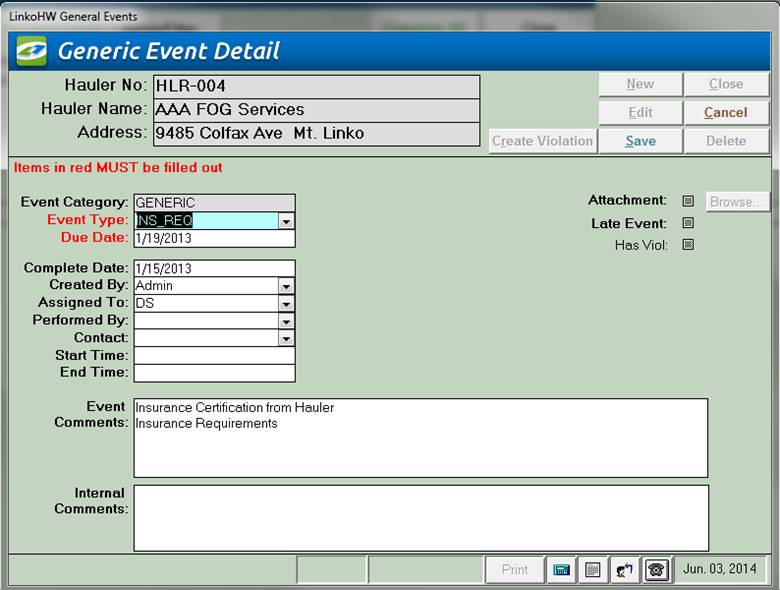
The General Event type has fields on it to record and display Generic information including Letter Printed Events and Phone Call log events.
|
Event Categories |
Different fields will become available in Event Details depending on which category was chosen at the Event Pick Box. This Generic Details screen has fields on it to
record and display Generic (phone log and other) information. |
|
Selector |
Description |
|
Hauler No |
ID of Hauler who’s Events are being displayed below. |
|
Hauler |
Name of Hauler who’s Events are being displayed below. |
|
Address |
Address of Hauler who’s Events are being displayed below. |
|
Buttons |
Action performed |
|
Opens Violation Details page allowing you to create a new Violation for this Event |
|
|
New |
Clears values and allows you to create a new Event. While editing, the New, Edit, Close, and Record Selector buttons will be disabled |
|
Edit |
Allows you to edit the displayed Event. While editing, the New, Edit, Close, and Record Selector buttons will be disabled |
|
Save |
Saves the changes made to the Event. Only enabled while editing or creating an entry |
|
Close |
Closes the screen |
|
Cancel |
Cancels any changes made to the Event. Only enabled while editing or creating an entry |
|
Delete |
Deletes the Event. |
|
Record Selectors |
Standard Record Selectors allowing you to move between displayed Events. |
|
Status Bar |
Reduced Status Bar allowing you to view a Calendar, a Calculator, Contact Information, or create a new Phone Log Event. |
|
Item |
Description |
|
Event
Category |
Event Category selected for this event. This field is not editable, and will always display what was previously chosen |
|
Event
Type |
This combo box lists all possible Generic types available. Use the Utility table "Event Types" in Event Administration to add events that you want to track which are not already present in the Event Types drop down list. |
|
Due
Date |
The scheduled date for the Event to be completed. |
|
Complete
Date |
Date the event was done. |
|
Attachment |
Attach or view existing attachments by clicking the magnifying glass |
|
Browse.. |
Opens a file browser allowing you to select a file for association. View the document once it has been entered here by clicking on the Browse button. |
|
Created
By |
Person who created this event. This can be used in bigger systems to track who is scheduling the events to be completed |
|
Assigned to |
POTW person assigned to complete the event. |
|
Performed
by |
Who completed the event. |
|
Contact |
If interaction with the
industry occurs, recording the contact will be useful information to
have. This field is not limited to
contacts associated with an Waste Hauler.
Simply type in the contact that you worked with |
|
Start
and End Times |
Again, if interaction with
the industry occurs, recording the time of interaction may be necessary
information |
|
Late
Event |
Whether or not this Event is late. If the event is late, this will be automatically filled in by the system |
|
Has Viol |
Whether or not there are any violations associated with this Event. If there are Violations, clicking this label will open the Violation screen listing all of the violations for this single event |
|
Pre
Notify/Post Notify? |
Pre Notify Events are either created on an Event Type level in the Event Administration Screen or on the fly within any of the Events screens (Samples Included). Pre and Post Notify will automatically generate events before and after the original events are due. For example, users can create a pre-event to notify POTW personnel of an upcoming sample event. This can be used to prepare the sample bottles and review the types of samples to take. This is a discontinued feature provided for backwards compatibility. Please see the Pre / Post Configuration setting. |
|
Event
Comments |
Comments about this Event. This field has an 8000 character limit. |
|
Internal
Comments |
Internal Comments about this Event. These do not display on reports. This field has an 8000 character limit. |
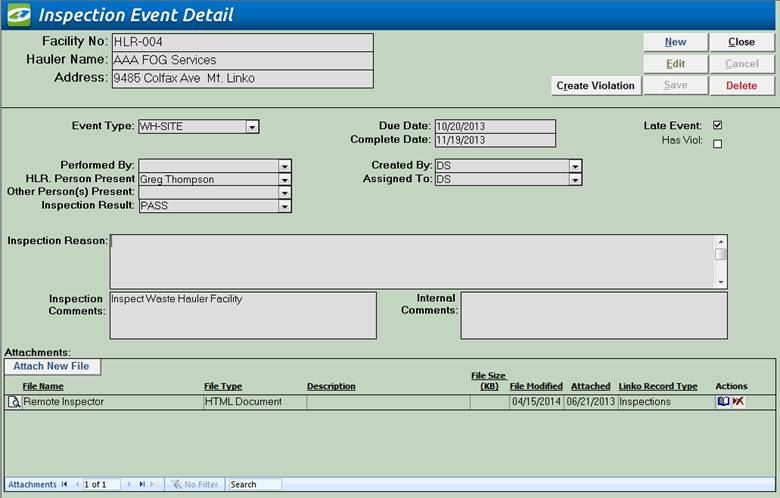
Use an Inspection Event for an Annual or Facility Inspection of a Waste Hauler.
|
Event Category Fields |
The Inspection Event Screen has fields that are
different than the fields that are displayed for the Generic Events Screen. |
|
Item |
Description |
|
Hauler Person Present |
This field will show a list of the contacts that exists for the Hauler, but a user can type any name that they want into the field. This identifies who the Hauler representative present during the inspection. |
|
Other Person(s) Present |
This field allows the user to add any other interested party who was present during the inspection. Multiple persons’ names may be typed directly into the field. |
|
Inspection Result |
You can select the result of the inspection from a list of typical results. When you want to add additional results types to the list, simply type it in and tell Linko to add it to the database when it asks. Or go to Event Administration under the Inspection Result Types tab and <Add New>. |
|
Inspection Reason |
Why is it being inspected? Annual, surprise and so forth. This field has a 254 character limit. |
|
Attachments: |
Add new attachments or view existing. See Using Attachments for more details |
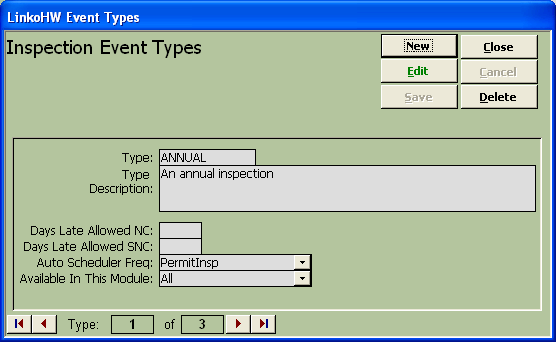
Use the Event Utility tables in System Administration to add types of events that you want to track, whether Inspections, Generic, Permits, Pump Outs or Samples.
|
Buttons |
Description |
|
New |
Clears values and allows you to create a new Event type. While editing, the New, Edit, Close, and Record Selector buttons will be disabled. |
|
Edit |
Allows you to edit the displayed Event type. While editing, the New, Edit, Close, and Record Selector buttons will be disabled. |
|
Save |
Saves the changes made to the Event type. Only enabled while editing or creating an entry. |
|
Close |
Closes the screen. |
|
Cancel |
Cancels any changes made to the Event type. Only enabled while editing or creating an entry. |
|
Delete |
Deletes the Event type. |
|
Event
Type / Description |
Enter the name of the event type and a description. |
|
Days Late
Allowed NC |
Is this an event you would like to check for non-compliance? If so add a number to this field that represents how many days late an event has to be prior to being considered Out of Compliance. The software will use this number when calculating event compliance in the Compliance Assistant. |
|
Days Late
Allowed SNC |
Is this an event you would like to check for SNC compliance? If so add a number to this field that represents how many days late an event has to be prior to being considered Out of Compliance. The software will use this number when calculating event compliance in the Compliance Assistant. |
|
Auto
Scheduling Freq |
What is the frequency you would like to use for this event in the “Auto Scheduler”? |
|
Available
in this Module |
Allows the user to choose in which Module this event will be available for selection. |
|
Record Selectors |
Standard Record Selectors allowing you to move between displayed Event Types for that Category. |
Because Sample Events are of particular interest to our users they have their own section in the Users' Guide. Click on Sample Management to view specific information on entering sample information.