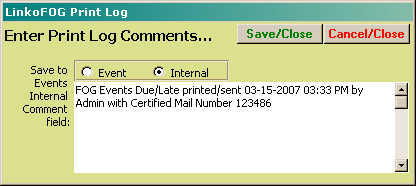
LinkoFOG allows you to create a history of when letters are sent. LinkoFOG will annotate the event comments or internal comments of any event that you print a Mail Merge Letter for. This allows you to easily keep track of your educational, permit related and other mailing campaigns.
|
Items |
Functions |
|
Add a Print Log Comment to your Event.
(letters printed from events) |
Choose
your Event(s) in Event Management, select Reports, choose
which letter you want to use, Preview it, Print it, and this window
opens. Select which Comment field in the Event you want to have your comments
added to. Enter your comments and Save. Now
in addition to having the printed letter, you also have added these comments
to the original Event record in LinkoFOG. |
|
Save to |
Selecting “Event” or “Internal” changes which
comment field in the Event(s) will get the Print Log Comment. |
|
Events Internal Comment field: |
This
is only visible when you have selected “Internal” as the Comments field. |
|
Events Comment Field |
This
is only visible when you have selected “Event” as the Comments field. |
|
Save/Close |
This
button puts the information in the “Save To” text field, into the selected
Comment field of the Event(s) (that you originally selected in the Event Management List View) and then closes the Print Log Comment form. |
|
Cancel/Close |
This
button will cancel the process of adding information to the event and then
closes the Print Log form |