Create new Types of Inspections, assign time periods for Compliance checking, and assign a Frequency for a Follow-up event scheduling.
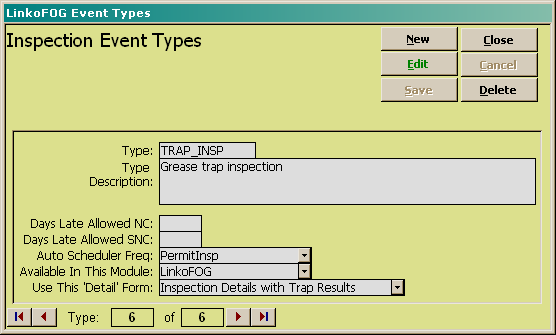
|
Buttons |
|
|
New |
Clears values and allows you to create a new Event. While editing, the New, Edit, Close, and Record Selector buttons will be disabled. |
|
Edit |
Allows you to edit the displayed Event. While editing, the New, Edit, Close, and Record Selector buttons will be disabled. |
|
Save |
Saves the changes made to the Event. Only enabled while editing or creating an entry. |
|
Close |
Closes the screen. |
|
Cancel |
Cancels any changes made to the Event. Only enabled while editing or creating an entry. |
|
Delete |
Deletes the Event. |
|
Record
Selectors |
Standard Record Selectors allowing you to move between displayed Event Types for that Category. |
|
Item |
Description |
|
Event Type |
Enter the name of the event type. |
|
Event Type Descriptions |
Describe the event type |
|
Days Late Allowed NC |
Is this an event you would like to check for non-compliance? If so add a number to this field that represents how many days late an event has to be prior to being considered In Non-Compliance. The software will use this number when calculating event compliance in the Compliance Assistant. |
|
Days Late Allowed SNC |
Is this an event you would like to check for SNC compliance? If so add a number to this field that represents how many days late an event has to be prior to being considered In Significant Non-Compliance. The software will use this number when calculating event compliance in the Compliance Assistant. |
|
Auto Scheduling Freq |
What is the frequency you would like to use for this event when automatically creating follow-up events? When this type of event is completed, LinkoFOG automatically creates a new event of the same type by taking the complete date of the event and adding this frequency to it to create a new due event. |
|
Available in this Module |
Allows the user to choose in which Module this event will be available for selection. Available Modules are based on which software you have purchased. |
|
Use This Detail Form |
Linko allows you to customize which screen to use for this type of event. Currently, only Inspections have a choice of screens. “Standard” is used for any screen where Trap Inspections Results like depth of grease are not measured. |