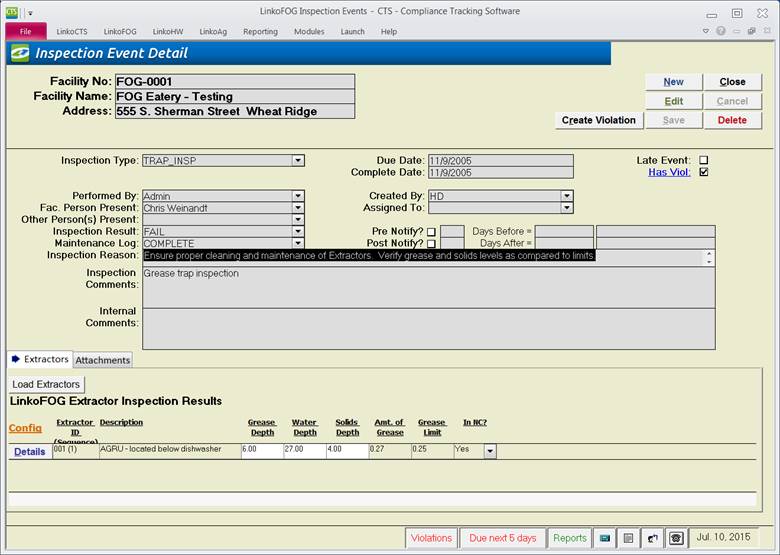
Track detailed measurements for the Depth of Grease, Solids and Water. LinkoFOG can automatically calculate the percent of grease and non-compliance and prompt you to create a notice of violation.
|
Buttons |
|
|
Create
Event |
A user can create a follow-up event from this screen by clicking “Create Event.” That follow-up event will default to a Pump Out for the Extractor that this Inspection was for. This allows the user to quickly create and track that the Trap is cleaned if a grease trap fails their inspection. The follow-up event will include details of the trap inspection including Amounts of Grease, Water, Solids, percent grease and Custom amounts. |
|
New |
Clears values and allows you to create a new Trap Result Details. While editing, the New, Edit, Close, and Record Selector buttons will be disabled. |
|
Edit |
Allows you to edit the displayed Inspection. While editing, the New, Edit, Close, and Record Selector buttons will be disabled. |
|
Save |
Saves the changes made to the Inspection. |
|
Close |
Closes the screen. |
|
Cancel |
Cancels any changes made to the Inspection. |
|
Delete |
Deletes the Inspection Event. |
|
Record
Selectors |
Standard Record Selectors allowing you to move between displayed Extractors if there is more than one for this Inspection. |
|
Status
Bar |
Reduced Status Bar allowing you to view a Calendar, a Calculator, Contact Information, or create a new Phone Log Event. |
|
Item |
Description |
|
Facility No |
ID of Facility whose Extractor was Inspected. |
|
Facility |
Name of Facility whose Extractor was Inspected. |
|
Inspector |
The
POTW personnel who performed the inspection |
|
Complete Date |
The
date the inspection was performed. |
|
Extractor ID (Sequence) |
Select
the Extractor (Flow Sequence) that the inspection is for. Sequence is useful in multi-compartment
traps that are inspected individually. If
a user tries to select a Trap from the drop down list that is expired, a
message will be displayed that the trap is expired: “Please verify that this
is the correct extractor.” |
|
Measurements |
|
|
Grease / Units |
The
Inspector must enter the observed depth of Grease but Linko will enter in the
Units as configured for the Extractor. |
|
Solids / Units |
The
Inspector must enter the observed depth of Solids but Linko will enter in the
Units as configured for the Extractor. |
|
Water / Units |
The
Inspector must enter the observed depth of Water but Linko will enter in the
Units as configured for the Extractor. |
|
Limits and Calculations Depth Limits Amounts Limits IN NC? |
The
‘Depth Limits’ and the ‘Limits’ fields are pulled from the Extractors tab in
Facility Management. The ‘Amounts’ are
calculated automatically from the observations that the Inspector enters.
Linko will automatically set the ‘IN NC’ field to YES if the calculated
Grease amounts exceed the limits as established in the Extractor
configuration for that Facility. If
‘IN NC’ is set to YES, a user will not be prompted to create a violation
until AFTER the trap results are saved. By
default, ‘In NC’ and ‘Grease Amount’ are calculated automatically by LinkoFOG
and cannot be changed. You can
optionally override these defaults by changing the configurations in Event Admin, Configurations, Global Configurations, Trap Inspection Results. |
|
Comments |
Any
comments the Inspector made on the trap, Grease and/or Solids observations. |