Once activated, the LabSync will import data from your LIMS automatically, there is no requirement to open the LabSync user interface for the synchronization to take place. However, there may be a desire to update configurations, review import logs or a need to map new location or other translation data so failed records will begin importing.
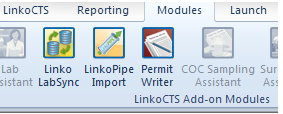
To configure or review LabSync data, open your LinkoCTS program and click on the modules ribbon bar item across the top of the screen.
After the notifications and transfers are completed, users may wish to follow the daily work flow outlined below.
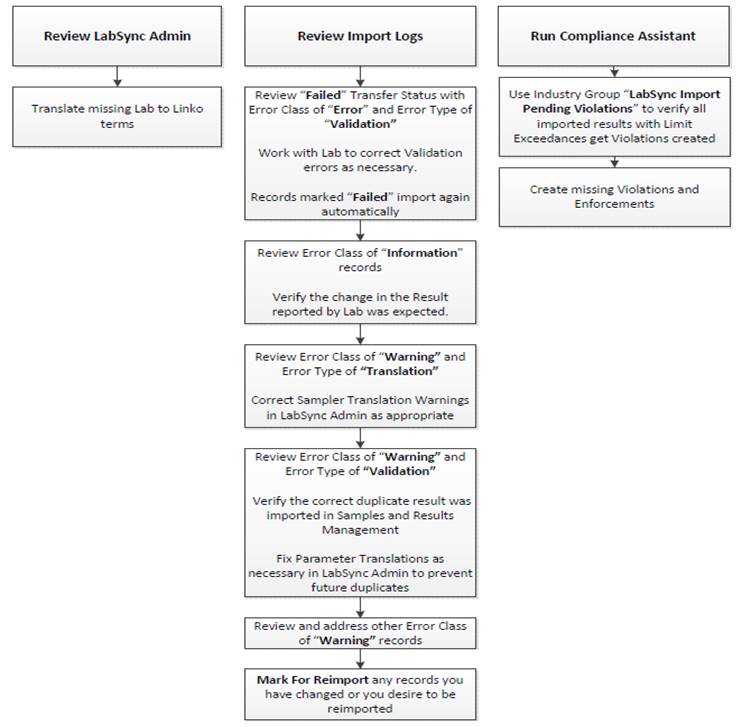
From the main menu, click the Review Import Logs menu option, which will take you to the LabSync - Import Log Review screen. The records displayed represent the LIMS records presented for transfer for the last 90-180 days, depending on your local configuration settings.
The status (TRANSFERRED), is waiting to be imported (PENDING) or has failed to import (FAILED). The data here will be as recent as the config value “Purge data from Linko LIMS Import Table after # Days” from LabSync Admin. (Ie will be the last 90 days of LIMS Reported Data)

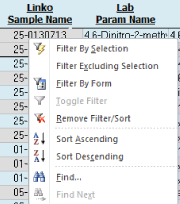
The data in the review screen can be filtered to display a user specified record set. Also available for filtering are options under the mouse right-click menu:
Users may filter on any of the criteria presented for review. The Received from Lab date range filter will display data based on the day it was presented to Linko for processing. Details of the filter criteria are listed in the table below:
|
FILTERING
CRITERIA |
|
|
Facility Name Facility No |
Shows a unique list of Facilities that are present in the Linko LIMS data table. |
|
Received From Lab |
Filter the list of data by date when the data was sent from the Lab to Linko LabSync. |
|
Transfer Status |
Shows a unique list of Transfer Status that are present in the Linko LIMS data table. Transferred means the data has been imported to Linko. Reported means the LIMS data is linked and ready for transfer, and the lab has marked it for available for review but not finally approved (QC Review) for use as compliance data. This may qualify data for email notices prior to being transferred from LIMS to Linko. Pending means it is ready to import. Failed means it did not import. View Error Message for reason why. |
|
Error Class |
Filter the list by the types of error messages. Information or Warning – the data was imported but an information message exists in Error Message Error – The data was NOT imported and the reason is in Error Message. |
|
Error Type |
Filter by the type of error. Results Differ – The result imported into Linko is different from the result that was sent from the Lab or that was already in Linko Translation – The data was not imported because there is a translation missing Validation – a required fields was missing from the Lab or the result sent from the lab is not a valid Linko result. |
|
Filtering |
Right-click on any field in the grid to refine your filter even more than you can using the Filters at the top of the screen. |
|
Received From Lab |
The date when the data was sent from the Lab to Linko LabSync. |
 Review
Log Data
Review
Log Data
Any of the data elements may be reviewed or used as a quick-filter from the mouse right-click feature. The log data elements may be used to provide an overview and status of the samples and results being presented to Linko from LIMS for transfer.
To see all columns of data, users may need to use the horizontal scroll bar at the bottom of the screen. On-screen sorting is available through the right-click menu options or by clicking any of the column headers to sort on that column of data. Users may also use the vertical scroll bar to move up and down to view data.
Users may check any result record in the list to be marked to “excluded” from the import to Linko process. If checked, the result record will not be transferred to Linko.
|
LIST VIEW
NOTEWORTHY FIELDS |
|
|
Exclude From Import |
Check this box to permanently exclude that record from future imports. Even if the lab result changes, these records will never be imported again. |
|
Duplicate Result? |
A value Yes indicates that there is more than 1 result for a particular parameter in the same sample. Typically caused by 2 or more lab parameters being translated to a single Linko Parameter. You must review the samples in Linko Sample Management to determine which result was used. |
|
Lab Reported Date |
The Lab Reported Date as reported in the LIMS |
|
Linko Last Imported Date |
If a record is imported into Samples and Results more than once, such as when the lab result changes or a user Mark For Reimport, this is the last time it was imported. |
|
|
|
1. Information - Import still occurs, notes get logged in target result and error log
2. Warning – import still occurs, notes get logged in error log
3. Error – import fails for these results, notes get logged in error log
These are logged on a Parameter result level. A parameter result may have more than 1 Warning and Information log, so those are listed together. A parameter result will always only have 1 Error message. Error messages are cleared after a result imports successfully. Warning and Information messages are not cleared – so it is possible for a successful transfer to contain a Warning or Informational note (e.g. results differ).
|
Error Class |
Error Type |
Error Message |
Occurs how? |
|
Information |
Results Differ |
The result from the Lab differs from the result added to Linko. Result from Lab: 0.05 mg/L (Prepended to existing Comments) |
Linko Result <> LabResult , Linko Limit Unit is different than LIMS Unit |
|
Information |
Results Differ |
The result in Linko was overwritten with a different result from the Lab Previous Linko Result: 0.05 mg/L (Prepended to existing Comments) |
Lab result is updated and automatically retransfers to Linko |
|
Warning |
Translation |
No Sampler translation was defined. Data will still be imported with no Sampler. |
Lab provided a sampler but no translation exists for it |
|
Warning |
Validation |
Duplicate parameter for this sample. Only 1 result has been imported. |
Post translation, more than 1 result exists for this parameter in this sample |
|
Warning |
Configuration |
No flow parameter has been configured so Mass cannot be calculated. Concentration results will still be imported. |
Calc Mass is configured but no Linko flow parameter was configured |
|
Warning |
Configuration |
Calculate Hold Time is configured but no Hold Time exists for this parameter. |
Analysis date/time not provided. |
|
Error |
Validation |
One or more required fields are missing (LabPermitMPID, LabDateSampled, LabSampleName, LabParamName) so the data cannot be imported. |
LIMS source view is missing data |
|
Error |
Validation |
One or more required fields are missing (LinkoDateSampled, LinkoSampleName) so the data cannot be imported. |
An initial import is attempted and it fails. User corrects the cause of failure (Like a missing translation) and attempts a reimport but the LabSampleName or LabSampleDate changed from its original value, causing these orphaned records to appear in the LIMS Import table. |
|
Error |
Validation |
The result is not a valid Linko Result (ND, MP, IR, NA, NF, <#, >#, #) |
|
|
Error |
Translation |
No Permit or Monitoring Point translation was defined. |
|
|
Error |
Translation |
No Parameter translation was defined. |
|
|
Error |
Translation |
No Collection Method translation was defined. |
No collection method was provided by the lab. Or no translation exists. Or no default was configured Or default no longer exists in Linko |
|
Error |
Translation |
No Unit translation was defined |
No unit was provided from the lab. Or no translation exists. Or no conversion factor exists. |
|
Error |
Translation |
No Sample Event Type translation was defined and/or a default has not been configured |
No sample event type was provided by the lab. Or no translation exists. Or no default was configured Or default no longer exists in Linko |
|
Error |
Translation |
No analysis method translation was defined. |
Configuration states ‘Force Translation’ but no translation exists. |
|
Warning |
Violation Exists |
The result was imported but a violation already existed. Verify the violation was not for this result. |
If the SAMPLE has a violation, none of the results will be imported (we do not know which result the violation is for) |
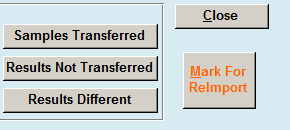
Three summary reports are offered to review samples and results data in the transfer log. The reports will return data found in the current on screen filter.
|
REPORT\ACTION
BUTTONS |
|
Samples Transferred: See a report summarizing all the samples with counts of results that were presented for transfer into Linko. This will include samples of all status’, and will be grouped by Transferred, Reported, Failed and Pending. Transfer status comments will be included, however, for each result within the sample, there may be more (different) reasons available as to why a sample failed. |
|
Results Not Transferred: See a report summarizing all the result records s that were NOT transferred into Linko. |
|
Results Different: See a report summarizing all the results that were transferred into Linko that had a different result then the Lab reported. This should be due a units conversion; if a limit in Linko is a different unit than the LIMS presents, the result will be converted to the Unit of the Limit. |
|
|
|
Mark For Reimport: When clicked, will force a retransfer of a sample result that has already successfully transferred. All non-transferred results that are not marked to be excluded will attempt to retransfer, however, if a new result comment or updated method is presented by the LIMS, users may wish to retransfer the values to Linko. Linko will only force a retransfer of results after a successful transfer if the source result value has changed. |