Available on the Menu Bar under File.
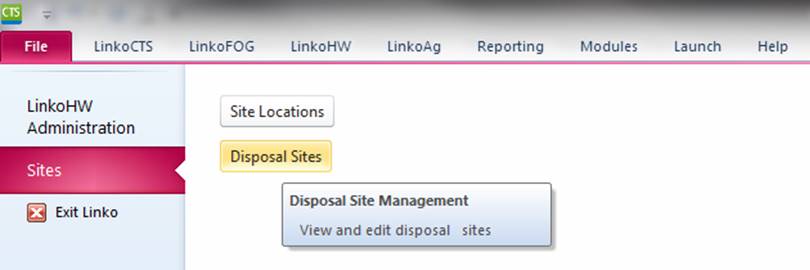
Track authorized locations where Waste Haulers can dispose of their wastes. Add your own POTW as a Disposal Site if you are receiving wastes.
Letters and Reports can be generated from the Disposal Sites screen, all letters and all reports are for all Disposal Sites. You cannot generate a letter or report for just the currently selected Disposal Site. If you want to modify the letters and reports for Disposal Sites, they appear under the PERMITS category in Flexible Reporter.
|
Letters and Reports |
Letters and Reports can be
generated from the Disposal Sites screen, all letters and all reports are for
all Disposal Sites. You cannot generate a letter or report for just
the currently selected Disposal Site. If you want to modify the letters and
reports for Disposal Site, they appear under the PERMITS category in Flexible
Reporter. |
|
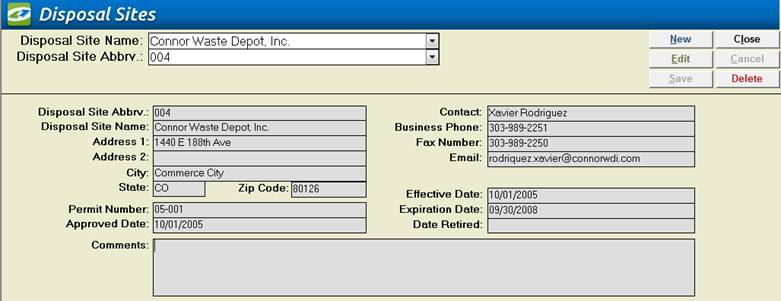
Disposal Site Name |
Pull-down
list of Disposal Sites in the Database. Select the Disposal Site by Name and
the information will be displayed in the lower section. |
|
Disposal Site Abbrv. |
Pull-down
list of the abbreviations of Disposal Sites in the Database. Select the
Disposal Site by its abbreviation and the information will be displayed in
the lower section. |
|
New |
Clears
values and allows you to create a new Disposal Site. While editing, the New, Edit, Close, and
Record Selector buttons will be disabled. |
|
Edit |
Allows
you to edit the displayed Disposal Site.
While editing, the New, Edit, Close, and Record Selector buttons will
be disabled. |
|
Save |
Saves
the changes made to the Disposal Site. |
|
Close |
Closes
the screen. |
|
Cancel |
Cancels
any changes made to the Disposal Site. |
|
Delete |
Deletes
the Disposal Site. |
|
Disposal Site Abbrv. |
This
value is needed for a Disposal Site to identify each site uniquely. The user
can enter any alphanumeric value but it must be unique. This is a required
field. |
|
Disposal Site Name |
Enter
/ edit the name of the Disposal Site here. This is a required field. |
|
Address 1 / 2 |
Address
lines for the Disposal Site. |
|
City, State, Zip |
Full
Location of the Disposal Site. |
|
Permit Number |
If
your POTW permits the Disposal Site, or if the Site is State certified, you
can use the information most valuable for your program. This field provides
flexibility in record keeping for the Disposal Site in your program. The Permit No. field is
updated to match the Site Abbrv. when the Site Abbrv. field is edited. The user can easily change
it as needed. If
you POTW program does not issue Waste Hauler Permits, simply let Linko fill
in this field with the Site Abbrv. This
is a required field. |
|
Approved Date |
Your
POTW or City may have a program to identify who is an approved Disposal Site
and you can use this field to indicate when they were approved. |
|
Contact |
The
personnel at the Site you would contact for business issues. |
|
Business Phone |
The
Disposal Site Contact’s phone number. |
|
Fax Number |
The
Disposal Site Contact’s Fax number. |
|
Email |
The
Disposal Site Contact’s Email address. |
|
Effective Date |
What
date the Disposal Site’s Permit became effective. This field provides
flexibility in record keeping for the Disposal Sites in your program. |
|
Expiration Date |
When
does the Permit expire? This field provides flexibility in record keeping for
the Disposal Sites in your program. |
|
Date Retired |
If
you want to maintain information on a site that is no longer being used, or
is not active anymore, you can indicate when it was retired from service.
This field provides flexibility in record keeping for the Disposal Sites in
your program. Entering
a Retire Date will prevent the Disposal Site from being visible in drop down
lists throughout the application. |
|
Comments |
Additional
information about the Haulers and functions at the Disposal Site. |