To start using the base rate calculations section click on the Base Rates button on the main menu. You will see the screen below:
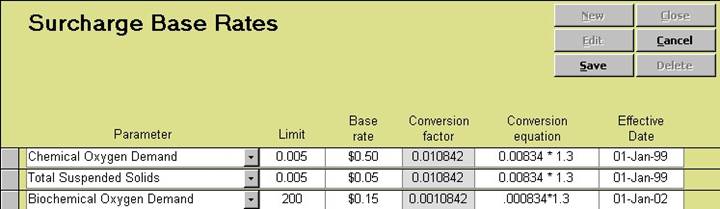
Select a parameter using the list box
Enter the Surcharge Limit (the concentration after which surcharges will be applied).
Enter the Surcharge Base Rate (the rate in dollars). Our system will average all of the results for the given parameter within the time period selected on the Invoices Screen. Then it will subtract the limit from the average concentration. If this is a positive number our system will then our system multiplies the value by the base rate and the conversion factor.
The conversion factor or the conversion equation is used to convert the rate into a value that can then be applied to the unit of water that the industry is measured in and will be surcharged for.
Enter the Date effective. Note! You may have more than one effective date for a surcharge parameter. When a surcharge invoice is calculated our system will use the surcharge limit that is most recent.