This is where the surcharge amounts and limits are set for the parameters that will be invoiced. You'll need to enter the parameters and surcharge limits for each permit and monitoring point before you can begin making invoices.
1. To begin, click on the Limits and Rates button from the main menu. This is where you set up your rates and limits for each parameter that you would like to surcharge.
2. Select the Permit for which you want to set surcharge limits for by using the list box at the top left of the screen.
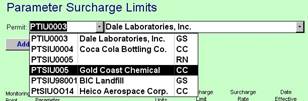
3. Click the New button.
4. Select a parameter using the list box 
5. Enter the units (although this is usually filled in by default).
6. Enter the Surcharge Limit (the concentration after which surcharges will be applied).
7. Enter the Surcharge Rate (the rate in dollars). This is the amount you would like to charge your industry in pounds per day. Our system will average all of the results for the given parameter within the time period selected on the Invoices Screen. Then it will subtract the limit from the average concentration. If this is a positive number our system will then take the Flow that is entered into the Invoices screen and calculate the mass in ppd.
8. Enter
the Date effective. Note! You may have more than one effective date for a surcharge
parameter. When a surcharge invoice is
calculated our system will use the surcharge limit that is most recent.
9. To add another parameter, click the New Button and repeat
the steps above.
10. To delete a limit, select the limit and click
Delete Button.
10. When finished, click the Close button.