|
Buttons |
Action performed |
|
Close |
Closes
form without saving any changes. |
|
Save Configurations |
Applies
the changes that were made. |
|
Add New |
Under
the different Tabs, Add New provides you the
ability to create a new member of the table. |
|
Details |
Under
the different Tabs, you edit / modify a member of the table with Details. |
|
Tabs |
Description |
|
Class Codes |
Add
or edit the Hauler Classifications being pulled into the Waste Hauler
Management Screen. |
|
CAT Codes |
Add
or edit the CAT Codes being pulled into the Waste Hauler Management Screen. |
|
SIC Codes |
Add
or edit the SIC Codes being pulled into the Waste Hauler Management Screen. |
|
NAICS Codes |
Add
or edit the NAIC Codes being pulled into the Waste Hauler Management Screen. |
|
Misc. Codes |
Add
or edit the MICS Codes being pulled into the Facility Management Screen. |
|
Compliance Status |
Add
or edit the Compliance Status being applied to the Hauler. |
|
Permit Note Types |
Add
or edit the Hauler Note Types being pulled into the Waste Hauler Management
Screen. Hauler notes are used to
describe all aspects of the Waste Hauler operation. |
|
Contact Type |
Add
or edit the Hauler Contact Types being pulled into the Contacts Details
Screen. |
|
Vehicle Types |
Add
or edit the Vehicle types and descriptions being pulled into the Waste Hauler
Management Screen. |
|
Vehicle Makes |
Add
or edit the Makes of the Vehicles that can be added to the Hauler Management
Screen. |
|
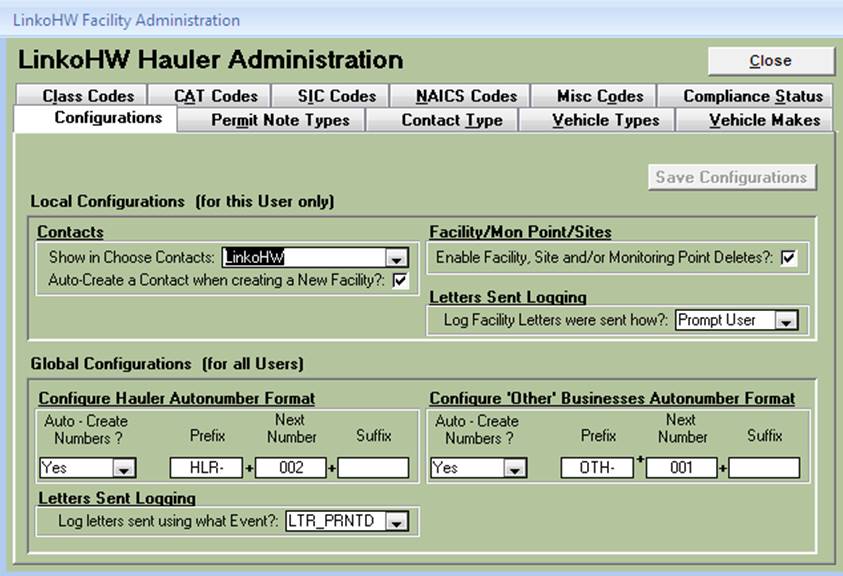
Configurations |
|
|
Local Configurations |
For This User Only |
|
Contacts |
|
|
Show in Choose
Contacts |
When
Selecting Contacts from the Choose Contacts screen, show all the Contacts or
just the Contacts from the selected available Linko Applications? You could
choose LinkoHW here; then just the Contacts from the Hauled Waste side of the
software would be available to select. If you also have LinkoFOG software and
select “All” then LinkoFOG contacts would also be available to choose. |
|
Auto-Create A
Contact when creating a New Hauler? |
When
you create a new Hauler you can select here whether or not a New Contact will
be automatically created. This affects the way your reports run, and Linko
recommends that you always create a Contact for each Hauler. |
|
Hauler/Mon Point / Sites |
|
|
Enable Hauler, Site
and / or Monitoring Point Deletes? |
To
allow the deletion of Haulers / Industries, Sites, and Monitoring Points,
check this box. When not selected,
these may not be deleted. |
|
Letters
Sent Logging |
|
|
Log Hauler Letters
were sent how? |
When
Mail Merge letters are sent, Linko automatically creates an event keeping
record of that action. When printing a Waste Hauler letter, log choices are:
Automatically, Prompt User, or Never. |
|
Global
Configurations |
For All
Users |
|
Configure Hauler
AutoNumber Format |
|
|
Auto-Create Numbers? |
When
creating a new Waste Hauler, should Linko auto-generate a new Industry /
permit number? |
|
Prefix |
Letters
to begin the auto-generated Permit number. |
|
Next Number |
Numbers
that count sequentially for part of the Auto-number |
|
Suffix |
Any
ending phrase for the permit. Default is a year value. |
|
Configure
‘Other’ Businesses AutoNumber Format |
|
|
Auto-Create Numbers Prefix / Next Number / Suffix |
When
creating a new Facility during the Disposal Data Entry process, should Linko
auto-generate a new Facility / Industry / permit number? How should that be
configured? |
|
Letters
Sent Logging |
|
|
Log Letters sent
using what Event? |
When
Printing a Hauler letter what Generic Event Type should be used to log that
action? |