|
Buttons |
Action performed |
|
Apply
/ Close |
Not
applicable on this screen. |
|
Cancel
/ Close |
Closes
form without saving any changes. |
|
Item |
Description |
|
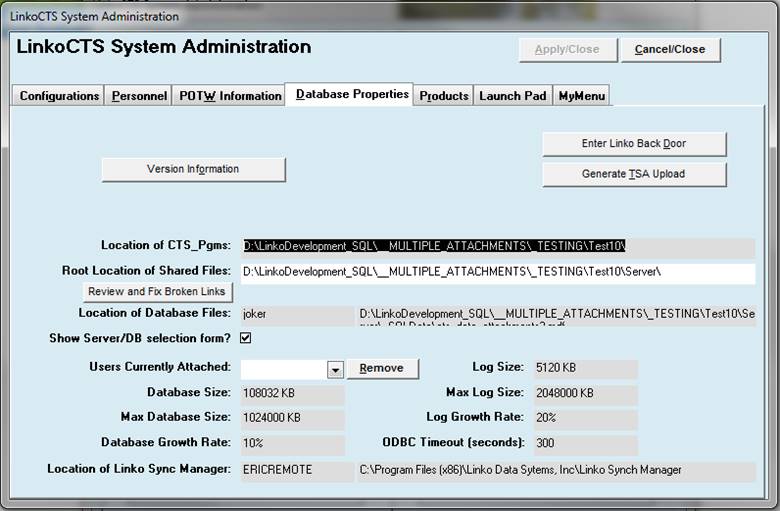
Location of CTS_PGMS |
This
identifies where the Client side of the Linko software resides. |
|
Root Location of Shared Files |
Linko
has a folder called Server that includes templates for Reports and documents,
and provides storage for Permit Letters, Docs, and Images. |
|
Location of Database files |
Shows
the name of the Server where the SQL database resides and the file path to
the SQL database on the SQL server. |
|
Show Server / DB selection form? |
This
check box controls the behavior of your login. When it is checked the window
that asks for what server and instance name will appear before you reach the
Username and Password window. |
|
Users Currently attached: |
This
is not currently implemented but is intended for administrative functions to
monitor how many users are attached and then be able to remove if there is a
need for maintenance. |
|
Database Sizes / Max Database Sizes / Growth Rates |
Like
most of these settings this information is mainly directed to the time that
you may need tech support. A quick check here allows the easy determination
of the SQL server database size, how much room it has been allocated. |
|
Location of Linko Sync Manager: |
Indicates the location where the Linko Sync Manager software is installed. This software brokers the synchronization of data between your Linko Software database and the Remote Inspector website used by inspectors in the field. |
|
Enter
Linko Back Door |
Allows
the user to enter a password to gain access to the tables, forms, queries,
code of the application. Contact Linko
for more details about this. |
|
Generate
TSA Upload |
This
utility surveys the Linko configuration and checks the MS Office installation.
It automatically uploads a summary of what it finds to Linko. It will only
run when you tell it to do so. |
|
Version
Information |
Provides
a summary of the LinkoCTS Version, updates, and server and workstation
information. See Versioning information. |